Learning how to record calls on Samsung Galaxy phones can be helpful in many ways. You might need it for interviews, training, or important talks. Samsung Galaxy phones make recording calls simple and convenient.
Before you start, it is important to know the legal rules. This guide will explain everything you need to know clearly.
Key Takeaways:
- Samsung phones offer easy built-in call recording options.
- Third-party apps provide extra features and cloud backup.
- Always follow local laws before recording calls.
Why You May Need to Record Calls
There are many reasons people record phone calls. Recording a call can save you time and effort. You do not need to take notes during important discussions. It also helps keep all details accurate and clear.
Some common reasons include:
- Record interviews: Journalists often record calls to ensure accurate quotes.
- Training purposes: Employees can replay recorded instructions or lessons later.
- Legal evidence: Recordings can help in certain legal cases.
- Medical or business calls: You can easily review important information later.
Recording a call also ensures you never miss important details. It gives you a full record of conversations that matter.
How to Record Calls on Samsung Galaxy Phones Using Built-in Features
Samsung Galaxy phones make recording calls very simple. Most Samsung phones include two different dialer apps—Google Dialer and Samsung Dialer. Both apps allow you to record calls, but they work differently.
Google Dialer App
The Google Dialer app automatically plays a message during recording. This informs both parties that the call is being recorded. It promotes transparency and follows legal guidelines.
Steps to record using Google Dialer:
- Open the Phone app on your device.
- Make or receive a call.
- Tap the Record button when available.
- The other person will hear a short recording alert.
- Tap Stop to end recording anytime.
- The recording saves automatically in your Recents or Recorded Calls folder.
This feature works in regions where call recording is legally allowed. It may not be available on all devices or carriers.
Samsung Dialer App
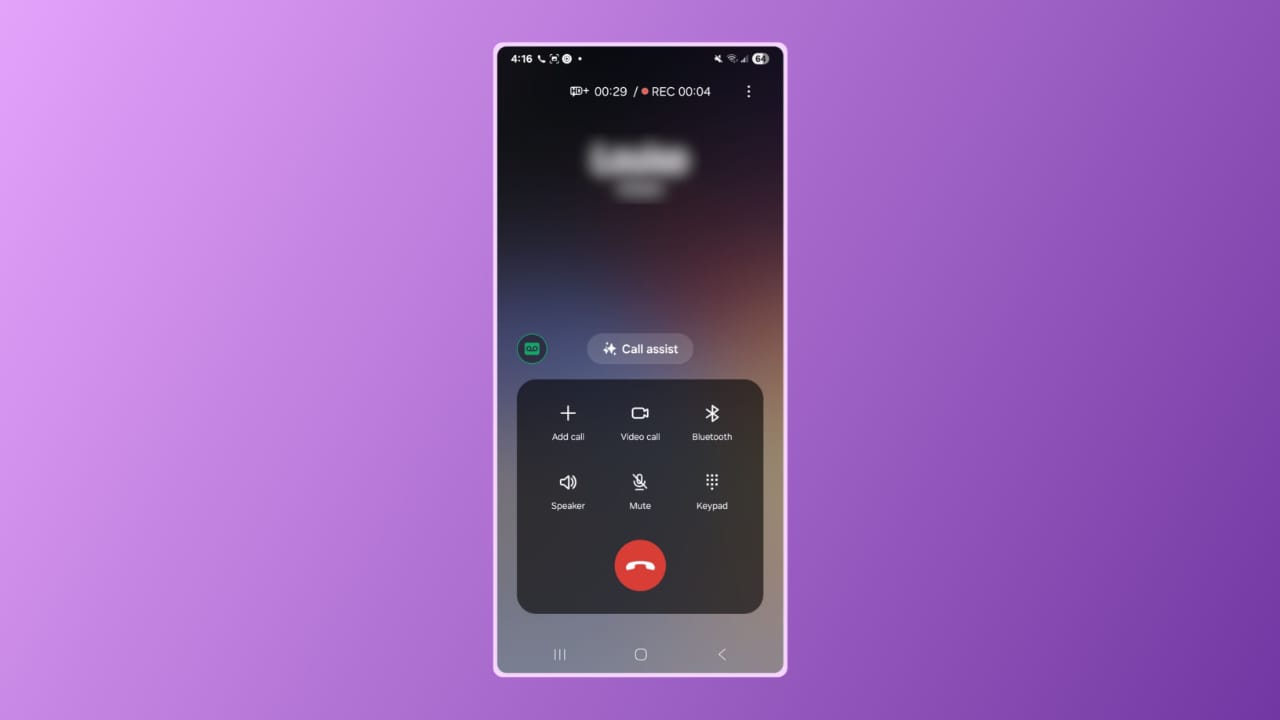
The Samsung Dialer app lets users record calls more privately. It does not play any alert sound during recording. However, you must still follow your local recording laws.
Steps to record using Samsung Dialer:
- Open the Samsung Dialer app.
- Make a call or answer an incoming one.
- Tap the three dots on the top-right corner.
- Select Record call from the menu.
- To stop, tap Stop recording.
- Recordings save automatically in the Voice Recorder or Phone app.
You can access, replay, rename, or delete the recordings later. The process is easy and takes only a few seconds.
Other Ways to Record Calls on Samsung Galaxy Phones
If your Samsung phone does not support built-in recording, don’t worry. You can use third-party call recording apps from the Google Play Store
These apps offer extra features that built-in tools might not have.
Popular third-party apps include:
- Automatic Call Recorder: Records calls automatically and saves them securely.
- Cube Call Recorder: Works for both phone and VoIP calls.
- ACR Phone App: Offers cloud backup and advanced organization options.
These apps can offer:
- Automatic or manual recording choices.
- Cloud storage for saving recordings online.
- High-quality sound and playback options.
- Easy sharing and exporting tools.
Before using these apps, check if they are compatible with your phone. Also, make sure they follow privacy rules in your country.
Legal Rules for Recording Calls on Samsung Galaxy Phones
Recording a phone call is not always allowed everywhere. The laws differ from one country or state to another.
Some regions need consent from one person on the call. Others require everyone to agree before the recording starts.
Always remember these points:
- Check local laws before recording any call.
- Ask for permission if your region requires full consent.
- Google Dialer automatically announces call recording to all parties.
- Samsung Dialer does not alert the other person, so use it carefully
Following the law protects you from legal trouble. It also maintains respect and trust between callers. Always use recordings for fair and responsible purposes.
The End Note
So now it’s possible to record calls on Samsung Galaxy phones safely and easily. You can use Samsung’s built-in dialer apps or trusted third-party options.
Remember to always follow your local laws and ask for consent before recording. Call recording is a powerful tool when used wisely, helping you stay organized and informed.