
The Google Dialer Interface Change has surprised Android users worldwide. Many phones update automatically without user permission or notice. The new look uses Material 3 Expressive Redesign. It offers colorful designs, bigger buttons, and smoother navigation.
While some users enjoy the modern appearance, others find it confusing. Social media is full of praise and criticism. This update is causing both curiosity and frustration everywhere.
Key Takeaways:
- The Google Dialer Interface Change gives Android a bold new design.
- Some features can be reverted, but most changes are permanent.
- Users worldwide are divided, with mixed reactions to the update.
Google Dialer Interface Change: New Layout and Features
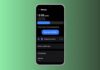
The new update changes the Phone app completely. Favorites and Recents are now merged into one Home tab. Top contacts appear first, followed by recent calls. The Keypad has a separate tab with rounder buttons.
The contacts menu is now hidden in the navigation drawer. Incoming calls use horizontal swipes to answer or decline. Pill-shaped buttons appear during calls, with the red End Call button clearly visible.
Why Android Users Are Confused
Many users did not manually update their phones. Familiar buttons now feel oversized and harder to use. Minimalist designs are replaced with bright colors and bold shapes.
Social media users worldwide display mixed reactions. Some users call it a modern and sleek design. Others say it is a distracting and unnecessary update. The red End Call button is too big for comfort. Overall, sudden changes upset many Android users.
How To Adjust the Google Dialer Interface Change
Some features can be restored through phone settings. The swipe-to-answer option can be reverted to single-tap. Go to Settings > Incoming Call Gestures to change it. To get the full old interface, uninstall the Phone app update.
Open the Google Play Store, search for ” Phone by Google, and uninstall the update. This brings the previous layout temporarily back. Google may not provide a permanent “classic view” option. Users must adapt to most new changes.
The End Note
The Google Dialer Interface Change introduces bold and colorful design updates. It improves usability and prevents accidental calls on phones. Many users feel surprised, frustrated, or even excited by changes.
Some options can be reverted through simple settings steps. However, most features are permanent and require adaptation. Whether loved or disliked, this update makes the Phone app noticeable worldwide.