
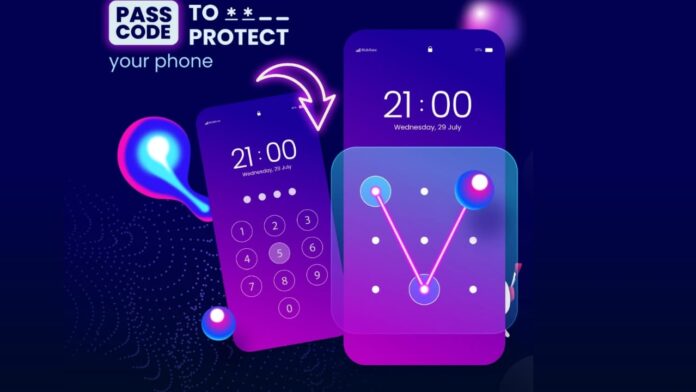
In today’s digital era, smartphone security is more critical than ever. Pattern Lock Screen is an exceptional and highly reliable lock screen application designed to give your phone an elegant, modern look while reinforcing your device’s defenses. It not only safeguards your personal data but also features a vast collection of premium, high-quality wallpapers to keep your display looking fresh and stylish.
Beyond advanced security, this application conveniently displays the date and time right on your lock screen. This eliminates the need to continuously unlock your device just to check the time, making it an incredibly practical tool for daily use.
Why is this App Useful?
The Pattern Lock Screen app is designed to prevent unauthorized access and protect your privacy without causing system lag. Here is why it stands out:
- Robust Data Privacy: It ensures that your private messages, photos, and apps remain strictly confidential and completely inaccessible to anyone else.
- Premium HD Wallpaper Collection: The app features a stunning, built-in library of high-definition backgrounds that you can swap out seamlessly based on your mood.
- Lightweight & Smooth Interface: Built with system optimization in mind, it operates efficiently without draining your RAM or slowing down your device.
- Universal Android Compatibility: It is fully optimized to work flawlessly across almost all Android platforms, whether you are using a mobile phone or a tablet.
Key Features
- Quick Toggle (Enable/Disable): You can easily turn the custom lock screen service on or off directly through the app settings with a single tap.
- Background Customization: Personalize your lock screen background using the app’s premium wallpapers or by uploading pictures from your own gallery.
- Ambient Clock Display: Displays the current time and date in clean, readable fonts without requiring you to input your passcode.
- 100% Free to Use: All premium features, custom grids, and high-definition wallpapers are completely free for all users.
- Privacy First: The app respects your data integrity and does not share your personal files or credentials with any third-party networks.
Step-by-Step Setup Guide
Configuring the Pattern Lock Screen on your device is simple and straightforward. Just follow these quick steps:
1.Download & Launch:Install the utility.
Download the app securely using the link provided at the bottom of this page, install it, and launch it on your device.
2.Enable Pattern Lock:Activate the service.
Open the application dashboard and toggle on the “Enable Pattern Lock” option, granting any necessary system permissions when prompted.
3.Draw Your Pattern:Secure your device.
Create a secure, custom unlock pattern by connecting at least four dots on the screen. Draw it a second time to confirm, then save your sequence.
4.Disable Default System Lock:Avoid double locking.
To prevent having to unlock your phone twice, tap the “Disable Default Lock” option inside the app. This will direct you to your system settings to safely turn off your old stock lock screen.

Generate Pattern Lock
Support and User Feedback
The developers of Pattern Lock Screen value user experience above all else. If you encounter any bugs, run into compatibility layout issues on your tablet, or want to suggest new features, you can contact the development team directly via the support email listed in the app.
Your Opinion Matters: If this utility successfully secures your phone and upgrades your screen’s aesthetic, please leave a 5-star rating and share your valuable feedback. Your positive reviews help developers roll out better optimization updates in the future!
Conclusion
If you are tired of your phone’s boring, stock lock screen and want to combine premium aesthetics with airtight data protection, the Pattern Lock Screen App is an ideal choice. Download it today to give your smartphone a fresh, modern look! If you found this guide helpful, don’t forget to share it with your friends and family across your social media channels.








Very nice????
Nice
Nice
Nice
Good
Nice
Nice
Nice
Nice
Very nice
Good
Very nice
Nice
Nice wow
Nice
Good
Good
Nice app
It’s good
Good
Very nice
Good
Very good
Nice ????????????????
Nice
Nice
Good
Nice
Nice
Nice
Nice
Nice
Good ????
Nice
Nice
Good
Nice
Nice
Nice
Very nice app
Very good
Good
Good working
Good
Thank you
Thank you’re welcome ????
Good
Nice
Good
Good
Very good fantastic ????
Good
Good ????
Good
Nice mobile
Super
Nice
Good
Very good
Very nice
Good
Good
Good ????????
Very nice
Nice
Good very nice
Good
Very nice
Good
Good ????
Nice
Nice
Good
Very nice
good
Good
Nice
Good
Good
Good
Nice
Good
Nice
Very nice
Good ????
Very nice
Good
Good ????
GOOD ????
VERY nice i
Nice
Good
Nice
Screen lock
Good
Very good
Good ????
Nice
Nice
Very nice ????
Good
Vary nice
Nice
Very good
Good
Very nice
Good
Very good
Good
Very nice
Good
Very nice
Good ????
Good
Nice
Good
Good
Good ????
Very good ???? job
Good
Nice
Very very very very good
Good good good
Good
Good
Good
Good ????
Good
Good ????
good
Good
Good
Good
Nice
very good
Very nice ????????
Nice trick
Good
Very nice
Very nice
Very nice
Very nice
So thank you
Screen lock
Pattern lock
Nice
Nice
Pattern lock unlock
Pattern lock
Pattern lock
Instagram pattern lock unlock
Good
Pattern lock
Good
Pattern lock
Pattern lock
Pattern lock screen
Good 💯💯
pattern lock
Pattern lock
Pattern lock
Pattern lock
Thank you